2/9 First Steps: Running Models on Ollama (20B → 120B)
Previous: When nvidia-smi Goes Blind: Setting Up btop on DGX Spark
The Playbooks
Before anything else — credit where it’s due. NVIDIA’s DGX Spark Playbooks are genuinely good starting points. Step-by-step guides for setting up AI workloads on the Blackwell architecture: installing frameworks, running inference, configuring dev environments, connecting and managing the device. Each one includes prerequisites, instructions, troubleshooting, and example code.
The collection covers the basics — VS Code setup (5 min), DGX Dashboard with JupyterLab (30 min), ComfyUI for image generation (45 min), LM Studio, and the one that matters for this post: Open WebUI with Ollama (15 min).
If you just unboxed a Spark, start there. The playbooks get you from zero to running in under an hour. What they don’t tell you is where the ceiling is.
The Standard Recipe
The Open WebUI playbook deploys a self-hosted AI interface that runs entirely offline. Docker container, integrated Ollama server, GPU-accelerated inference accessible through your browser. The whole thing takes 15–20 minutes plus download time.
Two ways to set it up:
NVIDIA Sync: Managed SSH tunneling with automated port forwarding on port 12000. Requires NVIDIA’s desktop tooling.
Manual via SSH: This is what I use. No keyboard, no monitor connected to the Spark — everything happens through a terminal over SSH. If you’re running the Spark headless like I do, this is your path.
The key detail the playbook glosses over: when you run a Docker container that exposes a web UI on the Spark, you can’t just open localhost:8080 on your local machine. The container is running on the Spark, not on your laptop. You need an SSH tunnel.
Before running anything, connect to the Spark with port forwarding:
ssh -L 8080:localhost:8080 midas@goldfingerThis forwards port 8080 on your local machine to port 8080 on the Spark. Now http://localhost:8080/ on your laptop actually reaches the container running on the remote hardware. Do this for every web-facing service you run on the Spark.
Then launch Open WebUI:
docker run -d -p 8080:8080 --gpus=all \
  -v open-webui:/app/backend/data \
  -v open-webui-ollama:/root/.ollama \
  --name open-webui \
  ghcr.io/open-webui/open-webui:ollama
Create an admin account, pull a model, start chatting. The playbook walks you through downloading gpt-oss:20b from the Ollama library.

Tip: If you forget your Open WebUI admin password, don’t overthink it. Shell into the container and delete the database — it resets everything so you can create a fresh admin account:
docker exec -it <container_name> /bin/bash
rm /app/backend/data/webui.db
Find your container name with
docker ps. Restart the container and you’re back to the first-run setup screen.
Works fine. Boring.
Why It’s Boring
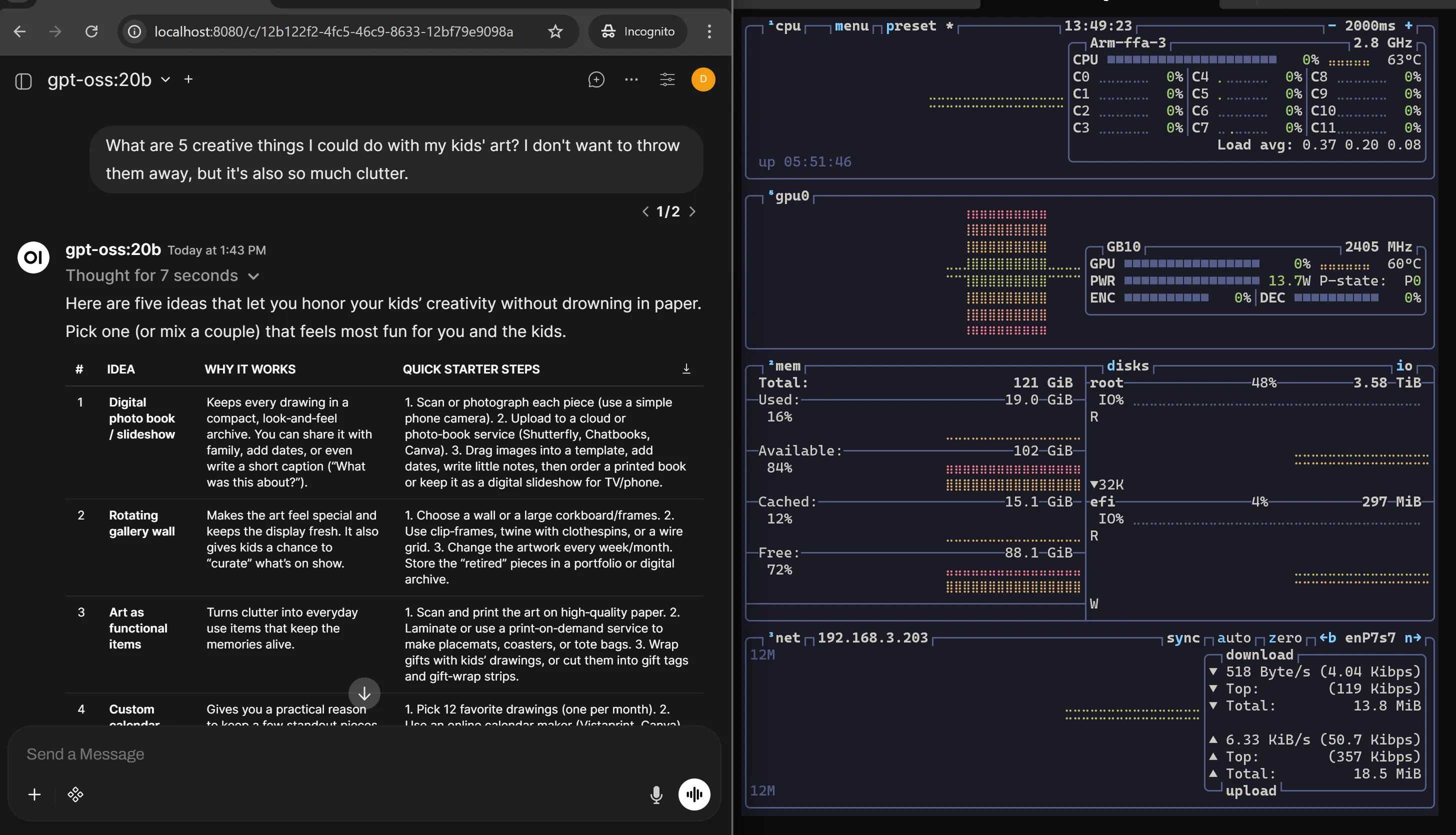
You don’t buy 128GB of unified memory for a 20B model. gpt-oss-20b runs comfortably, responds quickly, and uses a fraction of what the hardware can offer. It’s like test-driving a sports car in a parking lot. Yes, it works. No, you haven’t learned anything.
Scaling Up: gpt-oss-120b
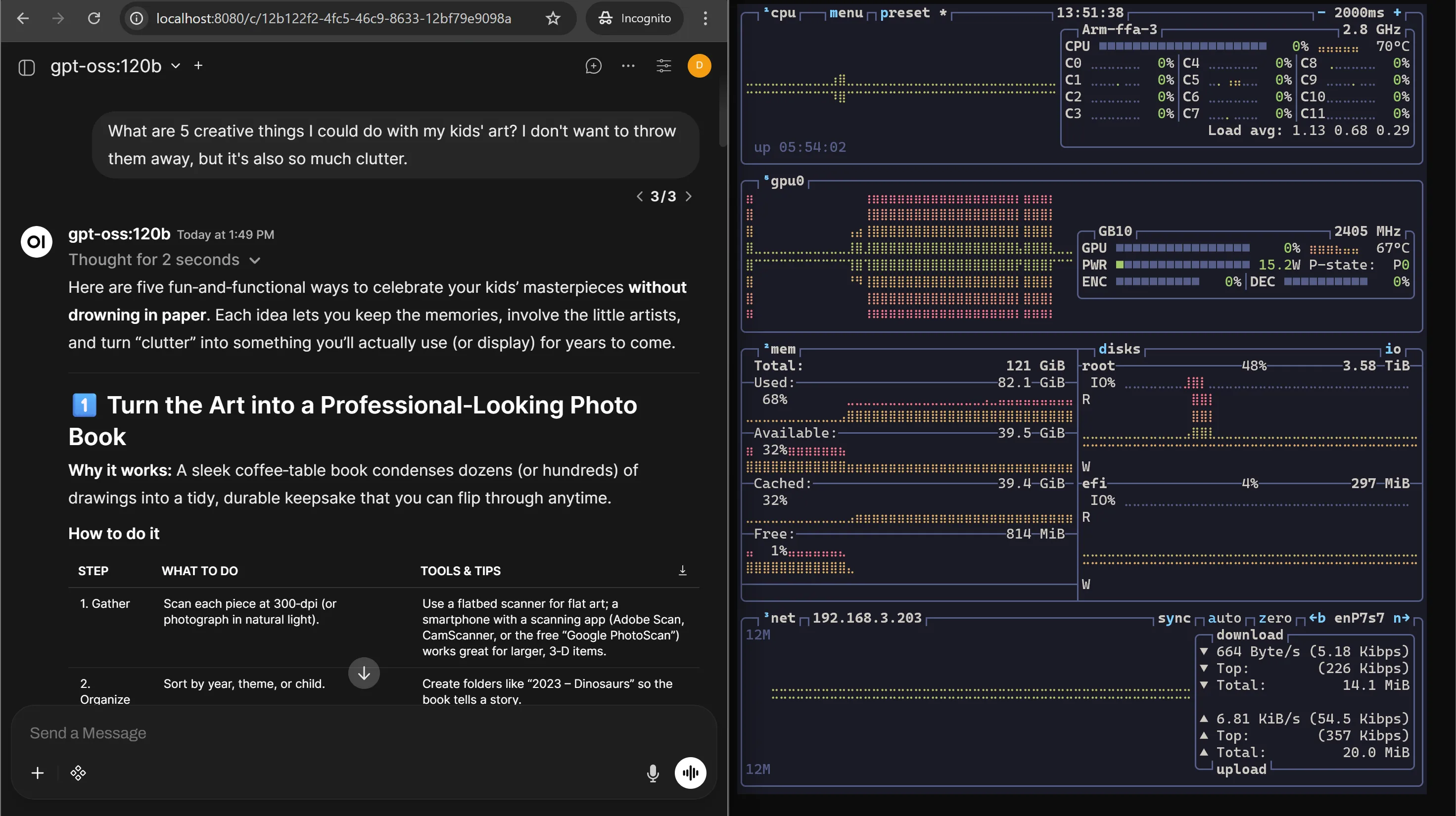
Ollama can also pull gpt-oss-120b. The 128GB unified memory handles it without flinching. This is the kind of model that would choke on consumer GPUs with 24GB VRAM. On the Spark, it just loads.
Why gpt-oss-120b on DGX Spark Is the Perfect Pair
This isn’t just “a big model on a big machine.” The 120B and the Spark were made for each other. Three reasons:
Memory fit via unified architecture. The model uses MXFP4 quantization — Microscaling FP4, a specialized 4-bit format with shared scaling factors per block of weights. But this isn’t crude post-training compression. OpenAI used Quantization-Aware Training: the MoE weights (over 90% of parameters) learned to operate in 4-bit during fine-tuning and reinforcement learning, while critical components like the router and embedding layers stay in BF16. The result is a ~70GB footprint that fits in 128GB unified memory with headroom left for KV cache and system processes. On consumer GPUs with 16–24GB VRAM, this model doesn’t even load. On the Spark, it runs natively.
Mixture-of-Experts efficiency. 120B total parameters sounds massive, but the MoE architecture (128 experts, 4 active per layer) only activates ~5.1B parameters per token. Sparse by design. That’s why the Spark’s GB10 chip can push this model at real speeds — you’re not computing 120B parameters on every forward pass.
Local agentic sandbox. This is the one that matters most. The 120B model running locally becomes a supervisor that orchestrates smaller models — automated code reviews, document analysis, complex reasoning — without sending sensitive data to the cloud. A fully local multi-agent system on a desktop-sized machine. That’s the actual use case, not chatting in a browser window.
For a deep dive into why Blackwell’s native MX-format support matters for this model — the dequantization tax, tensor core mechanics, and why the hardware and model were designed for each other — see Appendix A.
What the Playbooks Get Right
Ollama’s strength is simplicity. One command to pull a model, one command to run it. The Open WebUI integration gives you a clean chat interface. For getting started — for proving the hardware works and the models run — the playbooks are exactly right.
You should do this first, even if you’re going to move past it.
Tip from the playbooks: The DGX Spark uses Unified Memory Architecture — GPU and CPU share the same 128GB dynamically. Many applications haven’t fully adapted to UMA yet, so you may hit memory issues even when you’re well within capacity. If that happens, flush the buffer cache:
sudo sh -c 'sync; echo 3 > /proc/sys/vm/drop_caches'Keep this in your back pocket. You’ll use it more than once.
OK, So What Are the Limits?
After the initial testing I started thinking: this hardware has 128GB of unified memory, native 4-bit compute, and a model that was trained for it. What happens when multiple people use it at once? What if I run multiple agents in parallel?
That’s when I realized Ollama wasn’t the path forward.
The core difference: Ollama is built for developer ease of use on personal hardware. It’s a “plug and play” experience — simple installers, pull a model, run it. But it was never designed for production serving.
Concurrency. Ollama is fundamentally sequential. It has added basic parallel support, but under load it queues requests. Multiple users or agents hitting it simultaneously means high wait times. vLLM uses PagedAttention and Continuous Batching to handle hundreds of concurrent requests simultaneously with minimal latency. That’s not a minor difference — it’s architectural.
Memory management. Ollama uses a simpler memory model based on llama.cpp. Fine for a single user. vLLM’s PagedAttention reduces memory waste by 60–80% compared to traditional methods by allocating non-contiguous memory for the KV cache. On a machine with 128GB unified memory, that headroom matters — it’s the difference between serving one user comfortably and serving dozens.
Hardware optimization. Ollama excels at running on diverse hardware — Apple Silicon, AMD GPUs, CPU-only setups. That flexibility comes at a cost: it’s not optimized for any specific architecture. vLLM is built almost exclusively for high-end NVIDIA GPUs — A100, H100, and now Blackwell. It knows how to squeeze every drop of performance from the hardware the Spark actually has.
Model formats. Ollama uses a curated library based on GGUF quantized models. vLLM works natively with Hugging Face models in FP16, BF16, AWQ, GPTQ, and the MX formats that gpt-oss-120b was trained in. On the Spark, that native format support is the whole point.
The short version: Ollama is for prototyping on your laptop. vLLM is for building a production API or hosting a service for multiple users — or running the kind of multi-agent agentic workflows that make the DGX Spark worth buying.
The Takeaway
The NVIDIA playbooks get you running fast. Ollama with Open WebUI proves the hardware is real — 20B is boring, 120B is where it gets interesting. It works, and it’s the correct first step.
But Ollama is the starting line, not the finish. When you start asking “how many users?” and “how many agents?” — Ollama doesn’t have answers. vLLM does.
Next: Switching to vLLM: From 40 t/s to 3,975 t/s — Christopher Owen’s build tuned for DGX Spark, same model, same hardware, very different numbers.